


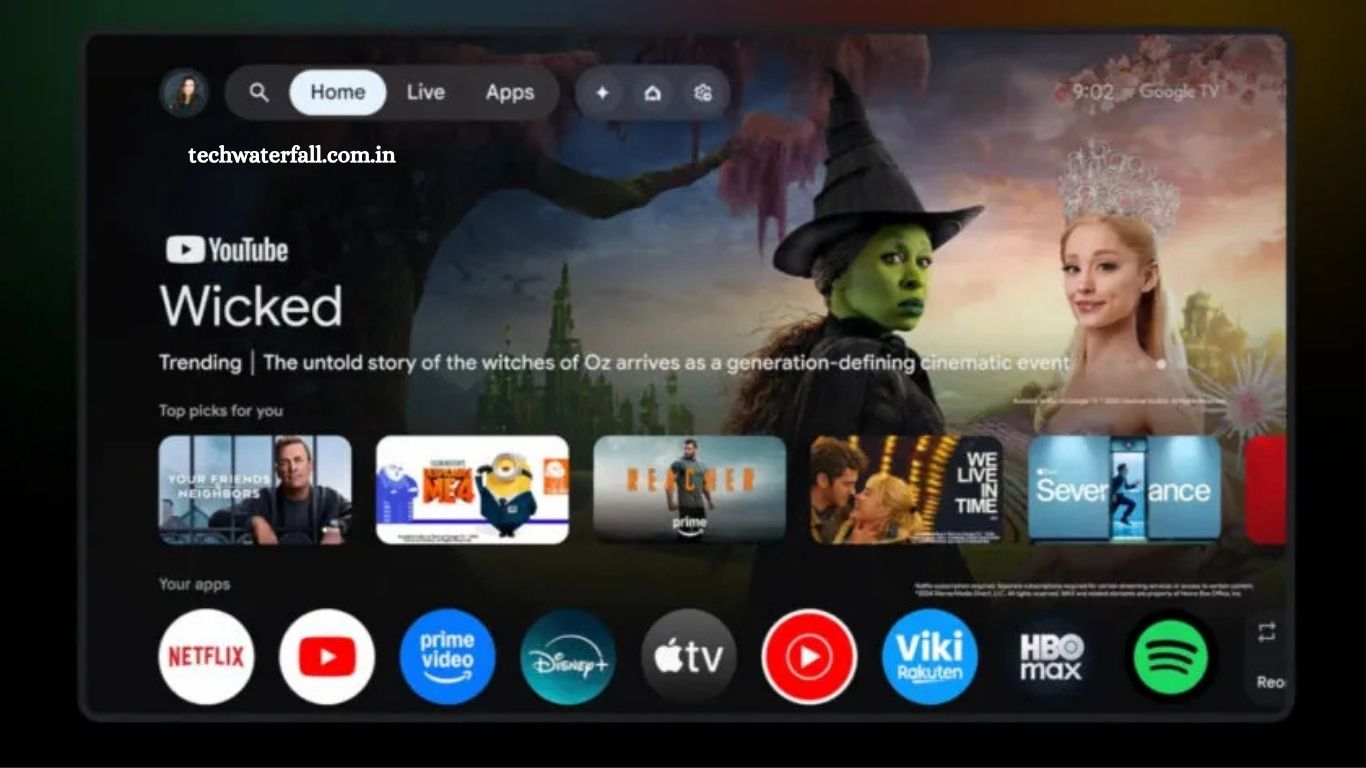
Google TV is rolling out a long-awaited refresh that promises to give your home screen a cleaner, more intuitive look. First spotted by a few early users, this redesign is now expanding to more devices, including TCL TVs and Walmart Onn models. Unlike typical software updates, this change is a server-side rollout, meaning it appears automatically without requiring any manual installation.
The update introduces a two-container navigation system, separating main content tabs like Home, Live, and Apps from quick-access buttons for Settings and Screensaver. Profiles have also been revamped with a dropdown menu for easy switching, along with shortcuts to Watchlist, Library, Your Services, and Content Preferences. Google is even promoting the new interface on its website, highlighting a more streamlined and visually appealing viewing experience.
Read More: Samsung rolls out stable One UI 8 update for Galaxy S24 series
What’s New in the Google TV Refresh?
The refreshed Google TV interface introduces a cleaner, more organized home screen. The redesign focuses on simplifying navigation and making it easier for users to access their favorite content. Unlike previous updates, this change doesn’t require a software download or update; it appears to be a server-side rollout, meaning Google is activating the new layout remotely.
Navigation Split into Two Pill-Shaped Containers
One of the most noticeable changes is the navigation structure. Google TV now separates navigation into two pill-shaped containers:
- First Container: This includes the main navigation options – Home, Live, and Apps. There is also a shortcut for the search function. Notably, the Home tab now replaces the previous For You tab, streamlining the content discovery process.
- Second Container: This container provides quick access to Settings and the Screensaver.
This separation makes the interface cleaner, allowing users to focus on content while keeping essential functions just a click away.
Redesigned Profile Menu
Google has also revamped the profile menu. The new design introduces a dropdown menu featuring:
- Profile switcher for multiple users
- Shortcuts for Watchlist, Library, Your Services, and Content Preferences
This update makes managing multiple profiles easier, helping families or shared households access their personalized content without hassle.
A Refreshed Home Screen Look
Google’s new design also emphasizes visual appeal. The home screen now highlights featured content more prominently, making it easier for users to discover new shows, movies, and live content. The layout aims to reduce clutter while offering faster access to popular functions, such as search and app shortcuts.
Which Devices Are Getting the Update?
Initially, the new interface was available to a small group of users during early testing. According to 9to5Google, the rollout has now expanded. Users with TCL TVs and Walmart Onn devices have reported receiving the updated home screen.
Because this appears to be a server-side update, no manual installation is required. Once Google activates the new design for your device, it will appear automatically the next time you turn on your TV.
Google Promotes the New Look
Google is not only rolling out the update but also actively promoting it. On the official Google TV website, the first image prominently features the new home screen layout. This indicates that the company is confident in the design and sees it as a major step forward for the platform.
Why This Update Matters
This refresh is more than just a visual facelift. It represents Google’s effort to improve usability and make content discovery more intuitive. Some key benefits include:
- Simplified Navigation: By splitting options into two pill-shaped containers, users can quickly reach core functions without navigating multiple layers of menus.
- Profile Management: The improved dropdown menu simplifies switching between profiles and managing personalized content.
- Server-Side Rollout: Users do not need to worry about updates or manual installations. The update happens automatically, ensuring a seamless transition.
- Enhanced Visual Appeal: The new layout is designed to be more modern and engaging, encouraging users to explore new content more effectively.
What Users Are Saying
While the update is rolling out to more devices, not all users have received it yet. Some early reports indicate that the change has significantly improved the user experience, making navigation faster and more intuitive.
However, there are users who have not seen the update on their devices. This staggered rollout is typical for server-side updates, as Google often releases changes gradually to ensure stability and to address any issues that arise before a wider rollout.
Comparing the Old vs. New Interface
- Old Interface: The previous home screen relied heavily on the For You tab, with multiple submenus and less intuitive navigation. Profiles and settings were scattered, requiring more steps to access frequently used features.
- New Interface: Navigation is consolidated into two main pill-shaped containers. The profile dropdown provides easy access to personalized features. Overall, the layout is cleaner, faster, and easier to use.
This makes the updated Google TV experience feel less cluttered and more user-friendly, especially for households with multiple profiles and varied content preferences.
Server-Side Updates Explained
For those unfamiliar, a server-side update is a change made remotely by the company rather than through a software installation. When Google pushes a server-side update:
- Your device receives the new interface automatically
- No action is needed from the user
- Rollouts are often gradual to manage potential bugs or performance issues
This explains why some users may see the update immediately while others will have to wait a few days or weeks.
What This Means for Google TV Users
For current Google TV owners, the refresh represents a noticeable improvement in usability and design. Here’s what you can expect:
- Faster navigation and access to key functions
- Simplified home screen for easier content discovery
- Improved profile management for households with multiple users
- A more visually appealing interface that highlights recommended content
If you haven’t seen the update yet, it’s likely on its way. Google typically rolls out updates gradually, so patience may be required.
Frequently Asked Questions
What is the Google TV refresh?
The Google TV refresh is an updated interface for the home screen, featuring a cleaner layout, split navigation, and improved profile management.
Which devices are getting the new Google TV look?
So far, TCL TVs and Walmart Onn devices have reported receiving the update. Google is gradually rolling it out to more devices via a server-side update.
Do I need to manually update my Google TV?
No. The refresh is a server-side update, which means it will appear automatically on your device once Google activates it.
What is the difference between the old and new Google TV interface?
The old interface relied on the “For You” tab and had more scattered menus. The new interface consolidates navigation, improves profile management, and highlights recommended content more clearly.
When will the update reach all devices?
The rollout is gradual. Some users may see it immediately, while others may have to wait several days or weeks.
Is the update available outside the U.S.?
Yes, Google is gradually rolling out the update internationally, but availability may vary by region and device manufacturer.
Conclusion
Google TV’s latest refresh is more than just a cosmetic change; it’s a thoughtful redesign aimed at improving usability and content discovery. With a cleaner home screen, streamlined navigation, and enhanced profile management, this update makes it easier for users to access their favorite shows, movies, and apps. While the rollout is gradual, it’s clear that Google is investing in a more user-friendly TV experience.