


Manufacturers are going thinner, sleeker, and lighter, but that often means sacrificing connectivity. You might get one or two USB-C ports, maybe a headphone jack if you’re lucky, and not much else.
So, what happens when you want to connect an external monitor, a mouse, keyboard, SD card, or flash drive — and your laptop barely has a single available port left after charging? That’s where a USB-C hub comes in to save the day. And right now, one of the best and most affordable options — the Acer 7-in-1 USB-C Hub — is available for just $17.99 (down from $24.99) on Amazon, a smooth 28% discount that makes it an incredible deal for anyone looking to expand their laptop’s capabilities.
Read More: Top Smart Speakers of 2025: Featuring Google Assistant, Alexa, and Siri
Why Modern Laptops Are Losing Ports
It’s no secret that laptop makers — from Apple and Dell to HP and Lenovo — have been trimming down ports for years. The shift to USB-C-only designs has made devices thinner and lighter, but also far less practical for users who rely on multiple peripherals.
Older laptops used to feature an HDMI port, several USB-A ports, an SD card slot, Ethernet, and a dedicated charging jack. Now, you’re lucky to get even two USB-C ports — and one of those is usually used for charging.
This minimalist design might look clean, but it leaves creators, professionals, and even casual users scrambling for more ways to connect their devices. That’s why hubs like Acer’s 7-in-1 adapter have become essential tools in 2025.
Meet the Acer 7-in-1 USB-C Hub
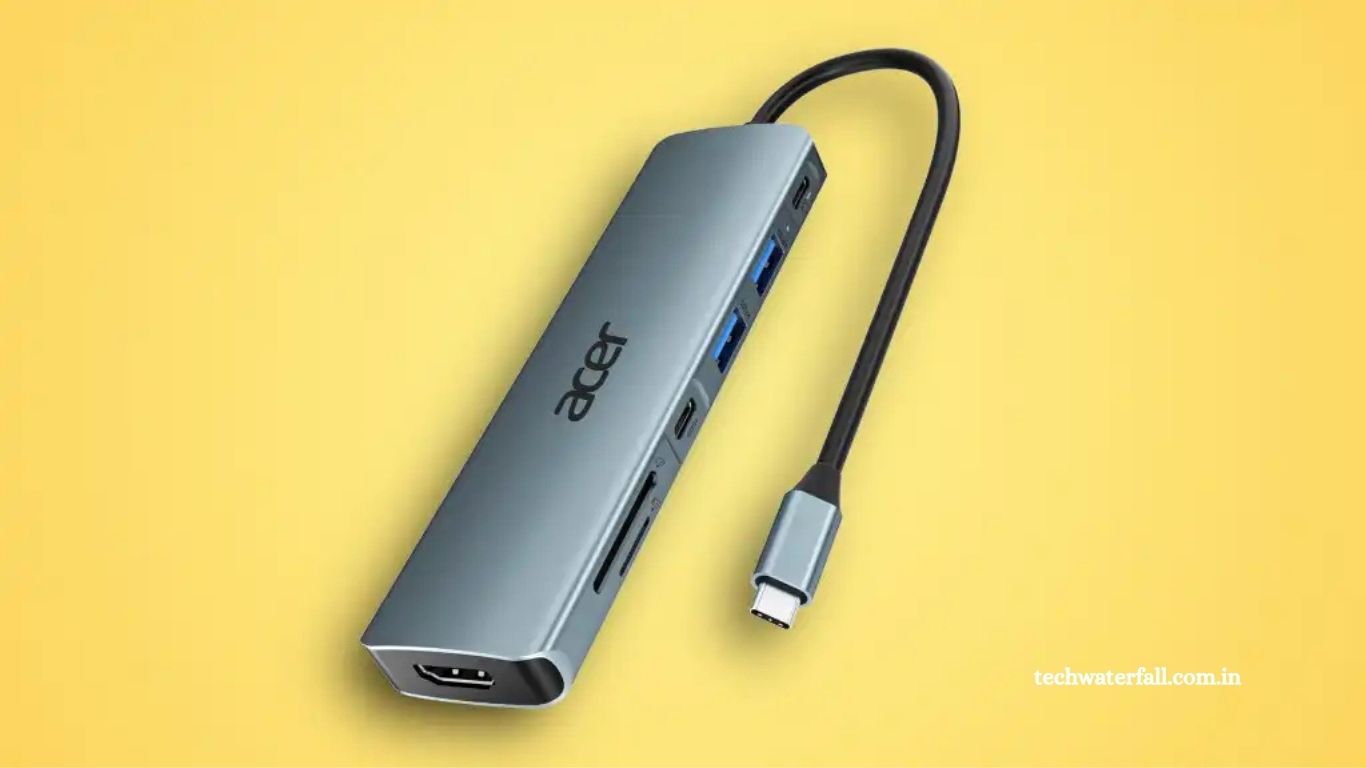
Acer’s USB-C hub is designed to transform your laptop’s lone USB-C port into a fully functional workstation. Despite its compact and lightweight design, it manages to pack seven different ports that cover nearly every need — from file transfers to 4K video output.
Here’s what it includes:
- 1 × USB-C Power Delivery Port (up to 100W) — Continue charging your laptop through the hub while it’s in use.
- 1 × USB-C Data Port — For fast data transfers with external SSDs and other devices.
- 2 × USB-A Ports — Perfect for mice, keyboards, flash drives, and other accessories.
- 1 × HDMI Port (up to 4K @ 30Hz) — Connect your laptop to an external monitor, projector, or TV.
- 1 × SD Card Slot — Transfer files from cameras and other devices.
- 1 × MicroSD Card Slot — Ideal for drone footage, smartphones, and smaller devices.
That’s seven ports in total — all running off a single USB-C connection.
Keep Charging While You Work
One of the standout features of the Acer USB-C hub is its 100W Power Delivery (PD) support. Many cheaper hubs can’t pass through power while they’re plugged in, meaning you have to choose between charging your laptop and using external devices.
This hub solves that problem entirely. You can plug your laptop’s charger directly into the hub, and it’ll continue delivering power while keeping all your other accessories connected. Whether you’re editing photos, transferring large files, or working with multiple displays, your laptop stays fully charged without interruptions.
Connect a 4K Display in Seconds
If you work with visuals, stream media, or just want to enjoy a bigger screen, the HDMI port on this Acer hub is a major win. It supports resolutions up to 4K at 30Hz, which means you get sharp, detailed video output perfect for productivity or entertainment.
Hook up your laptop to a monitor, projector, or TV and enjoy a seamless second-screen experience — great for video editing, watching movies, or expanding your workspace. It’s especially useful for users whose laptops no longer come with dedicated HDMI ports (which is increasingly common).
Compact Design, Premium Feel
Despite its versatility, the Acer 7-in-1 hub is impressively small. It easily fits in a laptop bag or even your pocket, making it ideal for travelers, digital nomads, and hybrid workers. The aluminum casing gives it a sleek, durable finish that matches most modern laptops — especially MacBooks, Chromebooks, and ultrabooks with minimalist designs.
It’s also plug-and-play, meaning there’s no need for drivers or setup. Simply connect it to your USB-C port, and all the available connections become instantly usable.
Perfect for Students, Professionals, and Creators
Whether you’re a student juggling online classes, a business professional in hybrid meetings, or a content creator editing photos and videos, this Acer hub can dramatically improve your workflow.
Here’s how different users can benefit:
🎓 Students and Remote Learners
- Connect your laptop to a larger screen for better multitasking.
- Plug in a USB drive, mouse, and keyboard at once.
- Transfer files from SD cards without using adapters.
💼 Office Professionals
- Extend your workspace with an external monitor.
- Use a wired mouse, keyboard, or headset while charging your laptop.
- Sync data across multiple storage devices simultaneously.
🎥 Content Creators
- Transfer 4K videos or RAW photos from SD and microSD cards.
- Connect an external hard drive for backups.
- Use multiple USB devices while keeping your system powered.
In short, this small accessory can completely change how you use your laptop.
How It Compares to Other USB-C Hubs
There are dozens of USB-C hubs on the market from brands like Anker, Satechi, and Baseus. However, Acer’s model stands out for combining high power delivery, 7-in-1 versatility, and an affordable price point.
- Anker’s 7-in-1 Hub: Around $25–$30 — similar functionality but slightly pricier.
- Satechi Aluminum Multi-Port Adapter: $60–$80 — premium build, but not budget-friendly.
- Baseus 6-in-1 Hub: $22–$25 — lacks separate SD and microSD slots.
At $17.99, the Acer hub offers the best price-to-performance ratio, especially when you consider it supports both charging and 4K HDMI output — features often reserved for more expensive models.
Why You Should Grab It Now
At the time of writing, this hub is available for just $17.99 on Amazon, down from its regular $24.99 price. That’s a 28% discount, matching the lowest price this accessory has ever reached.
Deals on quality USB-C hubs tend to disappear quickly, especially from trusted brands like Acer. So if you’ve been frustrated by your laptop’s lack of ports, this is your chance to fix that for less than $20.
With so many devices — from laptops and tablets to smartphones — adopting USB-C, having a hub like this isn’t just convenient; it’s practically essential.
Frequently Asked Questions (FAQs)
What devices are compatible with the Acer 7-in-1 USB-C Hub?
The Acer 7-in-1 USB-C Hub works with most modern laptops, tablets, and smartphones that support USB-C ports. This includes devices from brands like Apple (MacBook, iPad), Dell, HP, Lenovo, ASUS, and more.
Can I charge my laptop while using the hub?
Yes. The hub supports up to 100W Power Delivery (PD), allowing you to charge your laptop while simultaneously using other ports for accessories or displays.
Does the HDMI port support 4K output?
Absolutely. The HDMI port supports video output up to 4K resolution at 30Hz, perfect for connecting to external monitors, TVs, or projectors.
Do I need to install any drivers or software?
No installation is required. The Acer hub is plug-and-play, meaning you simply connect it to your USB-C port and start using it instantly.
Can it read SD and microSD cards at the same time?
No. While the hub has both SD and microSD card slots, they typically can’t be used simultaneously — you’ll need to access one card at a time.
Is it compatible with smartphones or tablets?
Yes. Many Android smartphones and tablets that support OTG (On-The-Go) functionality can use this hub to connect USB drives, keyboards, or even external displays.
Does the USB-C data port also support charging?
No. The USB-C data port is designed for file transfers and device connections only. Use the USB-C PD port for charging your laptop.
Conclusion
The Acer 7-in-1 USB-C Hub is a simple yet powerful solution to the growing problem of limited laptop ports. With support for 100W power delivery, 4K HDMI output, and multiple USB and card slots, it effortlessly transforms a single USB-C port into a full workstation. Whether you’re a student, professional, or creator, this compact device enhances productivity and convenience without breaking the bank. At just $17.99, it’s one of the best-value accessories you can buy to unlock your laptop’s full potential and stay connected wherever you work.