


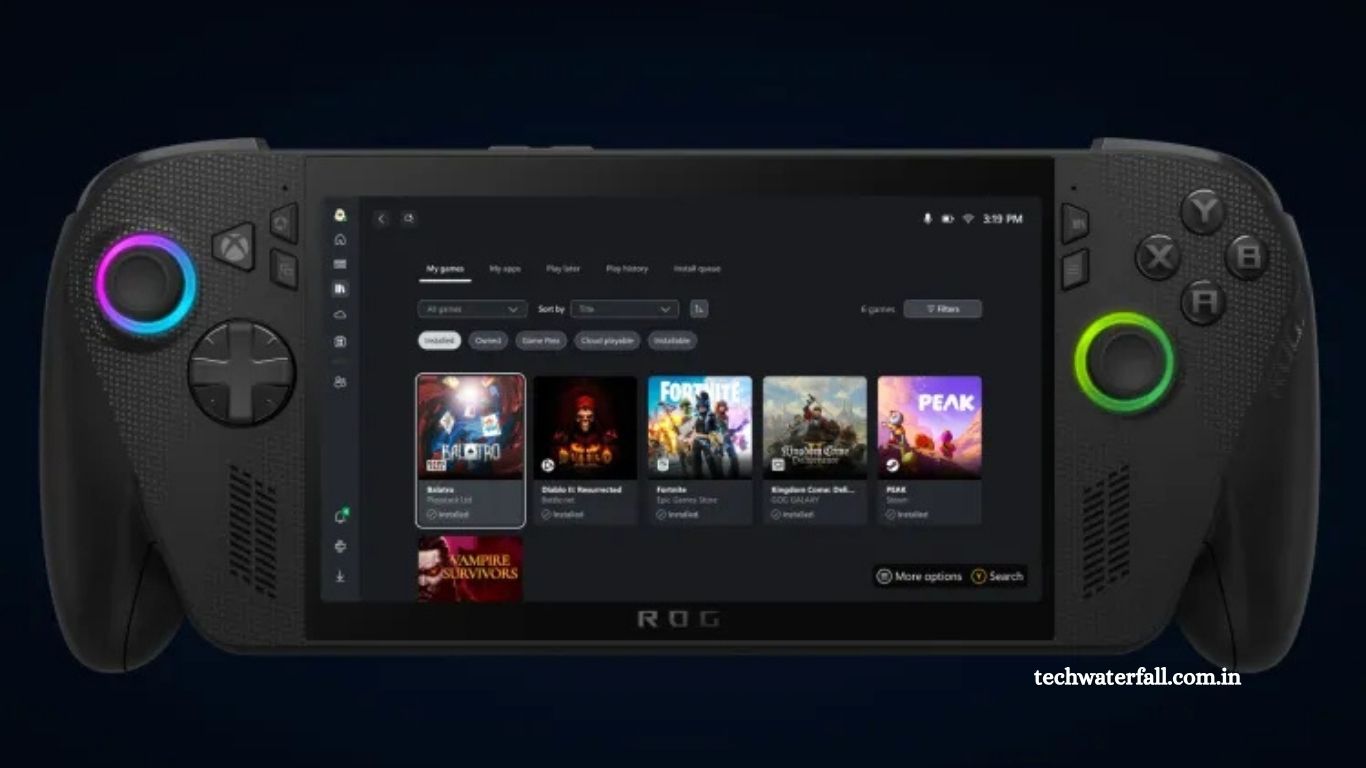
Microsoft has officially announced a major update to its Xbox PC app, bringing one of the most anticipated features for PC gamers — a unified game library that includes titles from Steam, Battle.net, and other popular PC storefronts. This marks a significant shift in how Microsoft envisions the future of PC gaming, turning the Xbox app into a true hub for all your games, regardless of where you bought or installed them.
The update, now available to all Xbox PC app users, introduces an aggregated library system that automatically detects and displays games from supported platforms. This means players no longer need to juggle between multiple launchers to find and play their games.
In addition, Microsoft has rolled out a brand-new My Apps section, aimed at giving users quick access to third-party tools, utilities, and even rival gaming platforms — all within one ecosystem.
Let’s explore how this update changes the PC gaming experience and why it represents a pivotal move for Microsoft’s gaming strategy.
Read More: macOS Tahoe: 50 New Features and Changes Worth Exploring
A Unified Game Library Comes to the Xbox PC App
The biggest highlight of this update is the introduction of an aggregated gaming library. Until now, the Xbox PC app primarily focused on games available through Xbox Game Pass for PC or titles purchased directly from the Microsoft Store.
With the new feature, your installed games from Steam, Battle.net, Epic Games Store, and other supported launchers will now appear automatically within the Xbox app’s library. This eliminates the need to switch between multiple apps to view or manage your games.
Seamless Integration
“When you install a game from a supported PC storefront, it automatically appears in ‘My Library’ within the Xbox PC app, as well as the ‘Most Recent’ list of titles in the sidebar, so you can jump back into your favorite games with just a click,” said Jason Beaumont, Vice President of Experiences at Xbox.
This streamlined approach not only makes it easier to find your games but also offers a consistent user experience across all platforms. Whether you’re launching a Steam classic, a Blizzard title, or a Game Pass exclusive, you can now do it from the same place — the Xbox PC app.
Why It Matters
For years, one of the biggest complaints from PC gamers has been the fragmentation of the gaming ecosystem. Players have to deal with multiple launchers, logins, and updates scattered across different platforms.
By integrating third-party storefronts, Microsoft is addressing a long-standing frustration in the PC gaming community. This feature is especially beneficial for those who own large game libraries across several platforms, allowing them to keep everything organized in one convenient dashboard.
Designed for the Future of Handheld Gaming
Interestingly, this integration is not just about desktop users. Microsoft has been testing and refining this unified library primarily for its upcoming handheld gaming devices, including the much-talked-about Xbox Ally series.
Xbox Ally and the Fullscreen Xbox Experience
The new aggregated library is designed to work seamlessly with the fullscreen Xbox experience, a mode that will debut with the Xbox Ally devices. These handhelds aim to compete with popular devices like the Steam Deck and ASUS ROG Ally, but with deeper Xbox ecosystem integration.
Having all your games — regardless of the store they came from — available in one unified interface is a game-changer for handheld gaming. Players can easily switch between titles, access cloud gaming, and manage updates from one intuitive screen.
A Step Toward Cross-Platform Synergy
This move also aligns with Microsoft’s broader goal of creating a unified gaming ecosystem that spans across consoles, PCs, and handhelds. Whether you’re playing Starfield on your desktop, Overwatch 2 on your laptop, or Halo Infinite on your handheld, the Xbox ecosystem now ensures your games, saves, and preferences travel with you.
Introducing the New “My Apps” Section
Alongside the library integration, Microsoft is also rolling out a brand-new My Apps section within the Xbox PC app. This feature is designed to make life easier for PC gamers who use various third-party tools, utilities, and apps.
What Is “My Apps”?
The My Apps section acts as a central hub for your PC gaming utilities. Here, users can quickly install or launch third-party applications such as:
- Web browsers
- Streaming tools (like OBS or Twitch Studio)
- Performance monitoring apps
- Gaming utilities
- Rival storefronts (like Steam or Epic Games Launcher)
This addition further positions the Xbox PC app as a true control center for all your gaming-related needs — not just for launching games, but for managing the entire gaming experience.
Built for Handheld Devices Too
Much like the aggregated library, the My Apps feature is also optimized for handheld gaming systems. It allows users to download, install, and launch other stores or apps without leaving the Xbox environment — perfect for those who want a streamlined interface when gaming on the go.
Microsoft envisions a future where the Xbox app becomes the main entry point for all gaming interactions on Windows devices, including handhelds and tablets.
Cloud Play and Game History Integration Coming Soon
Microsoft isn’t stopping there. Later this month, the company plans to expand the Xbox PC app even further with cloud-playable games and cross-device game history synchronization.
Cloud-Playable Games
Cloud integration will let players launch supported titles instantly from the cloud, without waiting for lengthy downloads or installations. This means if you’ve been playing a Game Pass title on your Xbox Series X, you can easily resume it on your PC or handheld through the same Xbox app.
Unified Game History
Microsoft will also introduce a feature that synchronizes your recent game history across all Xbox platforms — including consoles, PCs, and handhelds.
“Once this feature is released, look for the ‘Jump back in’ list on the Home screen of your console, PC, or handheld to find your recent play history and pick up where you left off,” explains Jason Beaumont.
This synchronization has already begun rolling out to Xbox consoles, and soon it will be fully functional across all devices connected to your Xbox account.
The Bigger Picture: Microsoft’s Vision for PC Gaming
Microsoft’s latest update to the Xbox PC app isn’t just a convenience feature — it’s a strategic move that signals the company’s growing commitment to PC gaming.
Competing with Steam and Epic Games
For years, Microsoft’s Xbox app struggled to gain traction among PC gamers who preferred platforms like Steam or Epic. However, this new cross-store integration flips the narrative.
Instead of competing directly, Microsoft is now embracing interoperability, turning the Xbox app into a universal launcher rather than a closed ecosystem.
This approach not only builds goodwill with gamers but also increases engagement with the Xbox Game Pass ecosystem, as players are more likely to stay within the Xbox app when all their games are accessible there.
Strengthening Xbox Game Pass for PC
This update will also boost the appeal of Xbox Game Pass for PC. With Game Pass titles sitting alongside games from other platforms, users will see the Xbox app as their main gaming dashboard, potentially leading to increased Game Pass subscriptions.
By integrating all your games, achievements, and cloud saves, Microsoft is creating a one-stop destination for PC gaming — an experience no other store currently offers.
The Evolution of the Xbox Ecosystem
To understand the significance of this update, it’s important to look at the evolution of the Xbox ecosystem.
Microsoft’s journey in PC gaming has gone through multiple phases — from the early days of Games for Windows Live (which failed to gain traction) to the robust and feature-rich Xbox app we see today.
This latest update shows that Microsoft has learned from its past mistakes. Instead of isolating players into one ecosystem, the company is now focused on integration, accessibility, and player freedom.
A True All-in-One Gaming Hub
With the addition of Steam, Battle.net, and other storefronts, the Xbox app is now more than just a Game Pass launcher — it’s a complete gaming hub.
Here’s what users can now do from one app:
- Access and launch all installed games (from multiple stores)
- Manage downloads and updates
- Use cloud gaming features
- Access Xbox Game Pass titles
- Install and launch third-party utilities
- Sync play history across devices
This kind of centralized experience is what PC gamers have been asking for, and Microsoft is finally delivering it.
What Gamers Can Expect Next
With this update now live, Microsoft is likely to continue refining the experience in the months ahead.
Gamers can expect:
- Expanded storefront support (e.g., Epic Games Store integration)
- Enhanced game discovery tools
- Performance optimization for handheld gaming
- More cross-platform synchronization features
As Microsoft continues to build bridges across platforms, it’s clear that the company wants to make Xbox synonymous with PC gaming freedom and flexibility.
Frequently Asked Questions (FAQs)
What is the new feature added to the Xbox PC app?
Microsoft has added an aggregated gaming library that displays games from multiple storefronts like Steam, Battle.net, and others in one place. It allows users to access and launch all their installed games directly from the Xbox PC app.
Does the Xbox PC app support Steam and Battle.net games now?
Yes, the new update integrates both Steam and Battle.net games. Any game you install from these platforms will automatically appear in your Xbox PC app library.
Can I launch Steam or Epic Games Store titles directly from the Xbox app?
Yes. Once your games are detected and displayed in the Xbox library, you can launch them directly from within the app without manually opening their respective launchers.
What is the new “My Apps” section in the Xbox PC app?
The My Apps section is a new hub that lets users install and launch third-party apps, including browsers, gaming utilities, and other storefronts — all from the Xbox interface.
Is this update available to all Xbox PC app users?
Yes. The update was initially tested with Xbox Insiders, but it’s now officially available for all users of the Xbox PC app on Windows.
How does this update benefit handheld gaming devices?
The update is designed with handheld devices like the upcoming Xbox Ally in mind. It provides a fullscreen Xbox experience, allowing players to manage and play games from different stores seamlessly on portable hardware.
Will Microsoft add cloud gaming to the Xbox PC app?
Yes. Microsoft plans to roll out cloud-playable games later this month, allowing you to play supported titles instantly without downloading them.
Conclusion
The new aggregated gaming library and My Apps section in the Xbox PC app mark a massive leap forward for both Microsoft and the gaming community. By bringing together titles from Steam, Battle.net, and other major platforms, Microsoft is finally addressing one of the biggest frustrations of modern PC gaming — fragmentation.
This unified experience not only makes the Xbox PC app more powerful and convenient but also signals a broader shift toward cross-platform harmony in the gaming industry.